General Guide
Who is this guide for?
This guide is for those currently using/testing the new version of the CRM web application for the Young Professionals Career Engagement Program. That includes the following:
Associated member of BYUMS headquarters
Program Directors
Regional Specialists
Regional Facilitators
Coaches
Other participants as assigned
Joining the Program as a Volunteer Coach and/or Mentor
To join the Young Professionals Career Engagement Program, you can visit https://ypcep.org/coaches-registration and complete the registration form. There is information at the top describing the responsibilities of each role. As you complete the form, use the Register As field to select which role you’d like to apply for.
Note
If you have been designated as a Regional Specialist or Facilitator and have been asked to complete the form, please register as a coach. The administrators will update your role as part of the role’s onboarding process.
Roles in the program
There are currently several roles in the program:
Program Leader
Regional Specialist
Regional Facilitator
Coach
Mentor
Young Professional
Some roles cover miltiple responsibilities, such as the combined “Coach and Mentor” role. Leaders will contact you if they believe that you would be a good fit to work with a particular Young Professional.
Planned or Requested Features
There are a few features that have been planned for or requested that have not yet been implemented. They include:
Report and data visualization dashboards
General communication features (these are in development and access may be granted on an individual basis)
General Navigation and Log In/Out
When you log in, you’ll be brought the application dashboard. This dashboard contains links to the different pages you will need for fulfilling your role. These pages area also acessible from the menu on the left-hand side of the webpage.
Tip
Some roles may have additional dashboard features. the Dashboard guide for more deatils.
Note
Visibility of pages and dashboards may vary depending on your role in the program Please see Role Specific User Guides to find more information about your specific role.
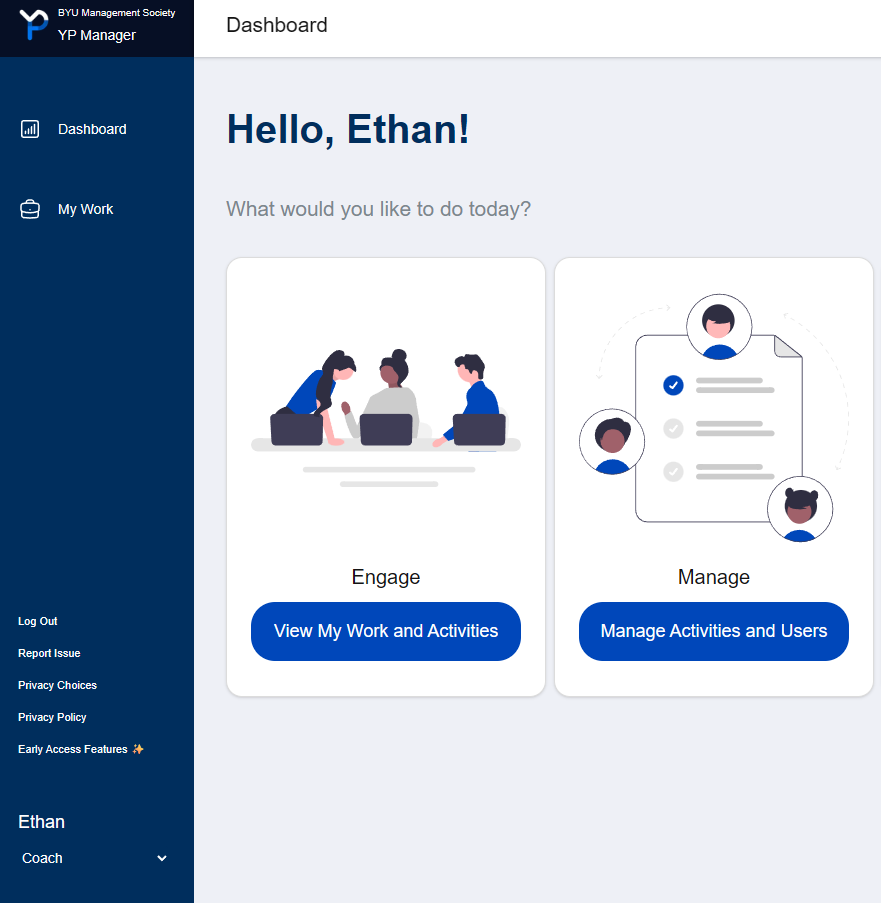
Some pages may have links to additional dashboards or pages. The top of each page will show where you are in the app.

Logging In
When you first visit the website, you will find an option to sign in with Google or an email.
When signing in with Google, your Gmail address must match the email you registered with.
When using an email, you must input the email you registered with. You will receive a one-time link to log into the playform.
Warning
If the email you want to use is different from the email you used when registering the program, you will need to contact a leader to have it changed.
Logging Out
To log out of the web application, select the Log Out link in the left-hand menu, near the bottom of the screen.
Email Alerts
Depending on your role, you may recieve notifications for YPCEP-related events. Please see the Email Notifications guide for more information, including instructions for unsubscribing.
Providing Feedback
If you encounter issues, or if there are features you would like to request, please use the Report Issue button location toward the bottom of the left-hand menu.
Early Access Features
Our developer team is constantly working to improve the application. You can try out some of our experimental features by enabling them in the “Early Access Features” menu. This menu can be opened by pressing the Early Access Features ✨ button in the left-hand menu.
Warning
Early access features are in development and may be unstable or have unexpected behavior. Some features may be unavailable based on your device or account role.